This is one part of Tout Compris — the complete restaurant app for rotas, stock, dish costing, reservations, HACCP and allergens. See the whole app →
Staff rota for restaurants

The rota is done, everyone knows it, and the hours add up. No WhatsApp group, no spreadsheet.

Sunday evening, next week’s rota. Who can work when, who asked for time off, who swapped last week without it being written down anywhere. Then a photo of the rota in the group chat, and on Tuesday the question “am I on tonight or not?”.

Tout Compris builds the weekly rota, shows each member of staff their own shifts on their phone, handles swaps and holiday with one approval from you, and records worked hours with a PIN. What you need at the end of the month, hours and wage cost per person, is already there.

14 days free, cancel any time. We have stood in the kitchen ourselves. This is the system we wish we had then.
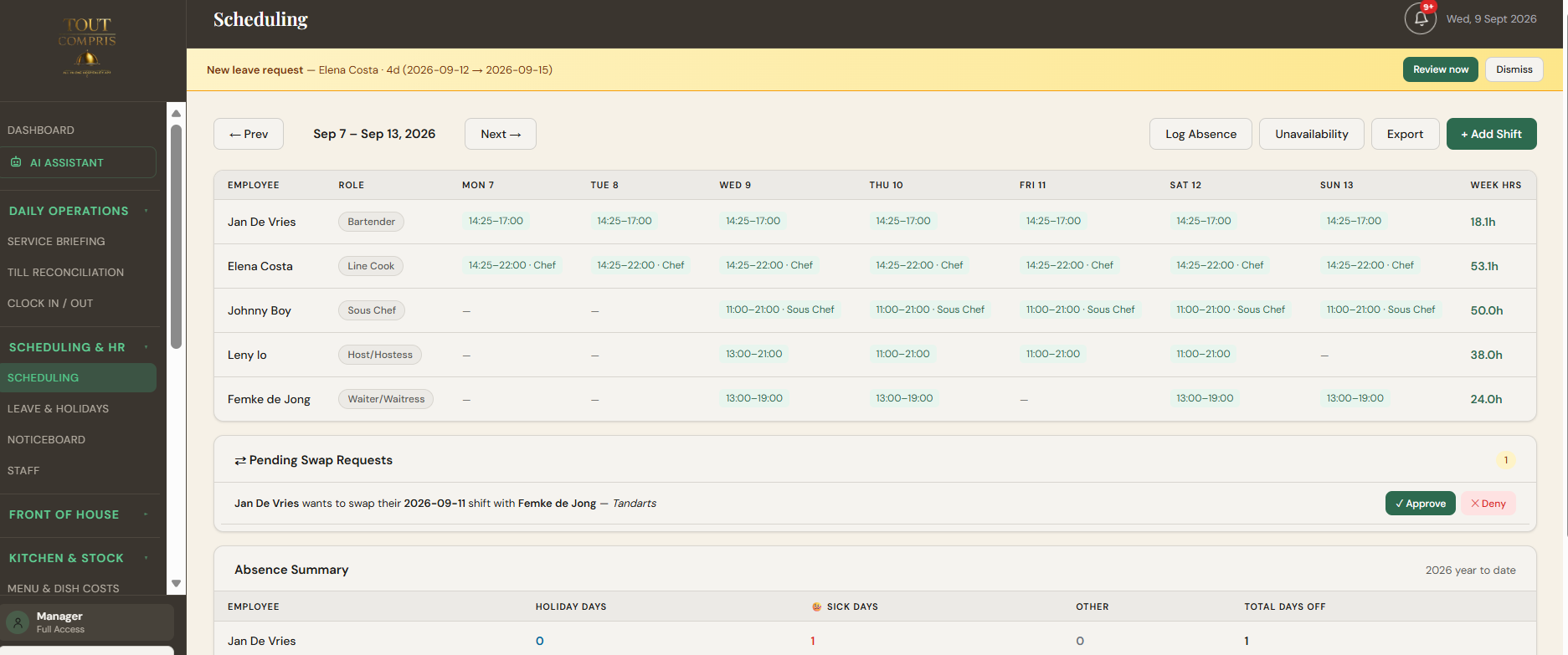
The weekly rota of Tout Compris on a laptop, in English: shifts per member of staff per day, with a holiday request and a pending swap in view
The weekly rota

A weekly rota you build in minutes

Pick the week, add a shift: who, from when until when, break, and the role for that shift. A filter shows only the kitchen or only the floor.

Repeat until. Does Sam work every Wednesday, Friday and Saturday? Set the shift once, choose “repeat until” and tick the days. The app creates the shifts for the whole period and skips days where someone already has holiday or unavailability.
No double bookings. About to rota someone twice at the same time? The app says so before you save.
Unavailability in view. Days someone cannot work show as a label on the rota. Pick that person for that day anyway and you see the warning in the form.
Staff see it themselves. Anyone signing in with their own PIN sees their shifts for this week and the two weeks after. No more photo in the group chat.
Swaps and holiday

Swaps and holiday with one approval

A member of staff asks, you approve or decline, and the rota adjusts itself. Nothing has to go through the group chat any more.

Swaps. A member of staff picks their own shift and a colleague and sends a swap request. You get a notification in the app and an email, and approve or decline. On approval the rota swaps the shifts.
Holiday. Holiday, sick leave or time off in lieu, with dates. Holiday and TOIL requests come to you as a notification; sick leave is recorded straight away. When approving you see that person’s balance, what it becomes if you say yes, and who else is already off those days.
Approved holiday blocks the rota. Those days get a label, and repeating shifts skip them.
Holiday days count the way hospitality works. A holiday day counts for each day the person was rostered. A weekend off costs two days, not none.
The clock

Clock in with a PIN, no fuss.

On a tablet by the door or in the kitchen runs the clock. Clock in, break, clock out: PIN, one tap, done.

Rule 1
Only when there is a shift. Clocking in opens fifteen minutes before the shift starts. With no shift that day, or a forgotten clock-out from an earlier day, the clock stops it and says why.
Rule 2
Breaks are not working time. Breaks come off the worked hours. If someone is still clocked in after five and a half hours without a break, the clock says so at the next tap.
Rule 3
Forgot to clock out. The manager closes the shift with the right time and a reason. It stays on record, so later it is clear what was adjusted.
Wage cost and exports

Wage cost and hours, ready for payroll

Rota, clock and holiday read the same shifts. At the end of the month there is nothing left to retype.

Hours × hourly rate, against your target. Per week or per month you see the actual wage cost next to the figure you set as a target, with a bar that changes colour as you get close.
Payroll as CSV. Per person the gross amount with a per-day breakdown, in one file your accountant or payroll bureau can use straight away.
The rota as a document. This week, next month or any period: one clean table per week, with everyone’s shifts, roles, notes and approved holiday, plus the hour totals. Print it, save it as a PDF, or export it as CSV.
Tips. Split a period’s tip pool equally or by hours worked, approve it, and keep and export each distribution as a record.
Built for the kitchen, not for an office
No app store.
Runs in the browser, two taps to put it on any phone’s home screen. Staff sign in with a PIN and see only their own part.
Head chef and floor manager see their own team.
Whoever runs a department rotas and exports for that department.
One source.
Rota, clock, holiday and wage cost read the same shifts. Update the rota and the rest follows.
Data in Europe.
Servers in Ireland, data processing agreement available.
What it costs

One subscription for the whole restaurant

The rota is one part of Tout Compris, alongside HACCP records, allergens, stock, dish costing and reservations.

€34.50 a month ex VAT for the first 100 restaurants, fixed for two years. €57.50 after that.

Fourteen days free; a card is needed, but nothing is charged before day 15.

Start free trial
FAQ

Questions owners ask about the rota

Does my staff need to install anything?
No. They open the address in their phone’s browser and put it on the home screen. They sign in with the PIN you give them. They see their own shifts, can request swaps, request holiday and mark themselves unavailable.
Can I copy a fixed rota to the following weeks?
Yes. Set a shift with "repeat until" and the weekdays ticked, and the app creates it for the whole period. Days with holiday or unavailability are skipped.
What if someone forgets to clock out?
The shift stays open and that person cannot clock in the next day until the manager has closed the shift with the right end time and a reason. No shift disappears, and no night gets counted as working time either.
Does it work with my payroll?
There is no direct integration. You export hours and gross amounts per person as CSV, which opens in Excel and goes to any accountant or payroll bureau.
Can the head chef build the kitchen rota?
Yes. A head chef or floor manager rotas and exports for their own department and sees their own team’s holiday balances. The full picture and the settings stay with the owner.
How are holiday days counted?
Per day the person was rostered, because in hospitality weekends are working days. If the rota for that period does not exist yet, the app shows an estimate and works out the exact number once you approve.
Read next: HACCP records app and Allergen matrix app. Or see the whole app with the 2½-minute demo. And we are always reachable at info@toutcompris.nl — we answer within one working day.
All included

You look after your guests. Tout Compris looks after the rest.

Start free — set up in an afternoon.

Start free trial